
HPL App

HPL’s App is a mighty tool that just got mightier. Now you can use it to check out your library materials.
It can also tell you what’s ready for pickup, what’s new in the collections, what’s due, and what's overdue. You can also check your borrowing history, see what’s on your shelves and find our branch locations.
Get the App


Features and Functions
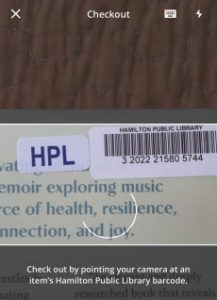
*New* Self Checkout: Tap the shopping cart in the top right corner, scan the item's barcode, then tap finish.
Personalized Dashboard
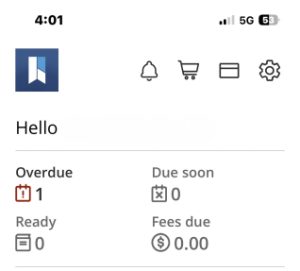
Overdue Items, Ready for Pickup, Due Soon.
Top Navigation Bar
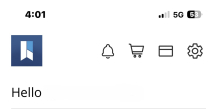
System Messages, Shopping Cart, Digital Library Card, Account Settings.
Bottom Navigation Bar
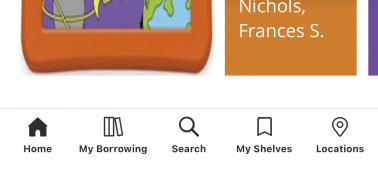
My Borrowing, Search, My Shelves and Locations.
HPL App
HPL’s App is a mighty tool that just got mightier. Now you can use it to check out your library materials.
It can also tell you what’s ready for pickup, what’s new in the collections, what’s due, and what's overdue. You can also check your borrowing history, see what’s on your shelves and find our branch locations.
Get the App
Features and Functions:
*New* Self Checkout: Tap the shopping cart in the top right corner, scan the item's barcode, then tap finish.
Top Navigation Bar:
System Messages, Shopping Cart, Digital Library Card, Account Settings.
Personalized Dashboard:
Overdue Items, Ready for Pickup, Due Soon.
Bottom Navigation Bar:
My Borrowing, Search, My Shelves and Locations.
App FAQ
-
In Settings, turn on Automatic App Updates. You can also download the update in Available Updates or delete your old version of the HPL App and install the new version.
If you have more questions, ask Staff in the branch, call 905-546-3200, email AskHPL@hpl.ca, opens a new window or chat with us at hpl.ca.
-
The loan period for most circulating items is 21 days with following exceptions:
- Express DVDs, opens a new window –3 days
- Magazines –7 days (adult and children's, non-renewable)
- Park Passes –7 days
- Book Club Kits –42 days
- Home Library Serrvice members’ loan period –120 days
When you check out materials – at a branch self-checkout machine, at a Staff information desk, or with the HPL App – you will be notified of the due date by a paper slip, via email, or on the App. You can also check MyHPL, opens a new window for due dates.